IN-Motion FAQ
IN-Motion is a Motion and Dynamic Simulation addin / plugin for Autodesk® InventorTM. It gets listed as an internal addin and upon selecting, it seamlessly let the user perform Motion and Dynamic Analysis of the InventorTM assemblies, without actually going out of the application.
IN-Motion can be used to check feasibilities of mechanisms and assemblies. If a user has designed an assembly and wants to check whether it would work or not ? What input parameters should be given for the assembly to work properly ? It also helps with valuable plots of position, velocity and acceleration of the parts and also has lots of other advanced features for the CAD engineer to explore upon.
- Automatically converts all InventorTM Constraints to corresponding Mechanical Joints
- Define Motion to Joints
- Define Force and Torque at Joints
- Define Spring and Damper
- Define Gravity for the Assembly
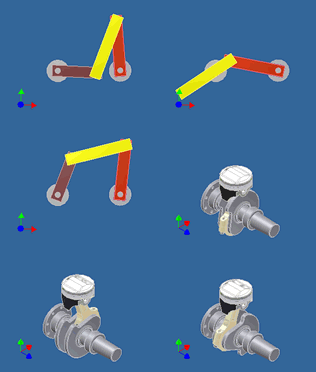
- Perform Motion and Dynamic Simulation
- Record the Simulation as an .AVI file
- View Graph Plots and Export the Plot Data as .CSV
- Trace parts during Simulation
IN-Motion gets listed as an internal addin. It has been developed to work seamlessly with Autodesk Inventor and the user does not have to go out of the application. Once IN-Motion is started, it converts all the Inventor constraints into appropriate mechanical joints and lets the user give certain input parameters. Upon simulation, the assembly is converted to a mathematical model for IN-Motion calculations and the results are later on shown in the form of actual animation of the assembly and also in the form of graph plots.
Kinematic Simulation takes into account only the geometry, configuration of the assembly and determines the position, velocity and acceleration of all the parts. It does not consider the forces acting. Whereas Dynamic Simulation takes into account both the geometry and forces acting on the assembly. Dynamic Simulation is considered to be more robust and generic in nature and it also gives more ways to analyse the assembly.
Educators, students and new engineers will find it ideal for the teaching and learning of geometry, kinematics, dynamics, mechanisms, linkages, machine design and physics. CAD Engineers can also use IN-Motion as a step in Rapid Prototyping by testing its working, without actually making physical prototypes.
Please watch the following tutorials:
1. Tutorial on IN-Motion Installation
2. Tutorial on IN-Motion Activation
Please read "Inventor Constraints" section in IN-Motion Help File. Almost all Inventor Constraints except Tangent Constraint and Motion Constraints are converted to appropriate IN-Motion Joints.
Most likely, IN-Motion would have encountered a Constraint that is not understood by it. Please let us know about your problem and we would be eager to help.
All real machines are made from non rigid parts that allow flexibility, even if the flexibility is invisible to the eye. This flexibility allows us to use imperfect and redundant joints without severe restrictions. For example, a door usually have two or more hinges which are not perfectly aligned, yet the door swings open and shut to our expectation.
In multibody dynamics simulation, however, the mathematical parts and joints are perfect. Parts are rigid. Joints are unyielding to motion that they are meant to restrict. Hence, redundant constraints must be removed before the mathematics can converge to a solution. For example, a mathematical door needs one hinge only to work as expected. Extra hinges actually prevent a mathematical solution.
IN-Motion has an advanced algorithm for automatic redundant constraint removal that works well for multibody dynamics. But the user needs to be aware of the problem when unexpected simulations occur. Then the user must define joints that eliminate redundant constraints from the assembly. For example, a mathematical door with two hinges defined may be jammed (no swinging) even though a huge force or torque is applied to it and the simulation runs without problems. The user need to realize that the extra hinge is redundant and slight misalignment between the two hinges caused the door to jam.
As is the case with almost all software, IN-Motion is under constant development. All the major bug fixes would be put up on our website. If you encounter any bugs, please contact us and we shall try to fix them. We also seek your valuable feedback to make this software more robust and user friendly.